

1. Introduction to Deeplinks
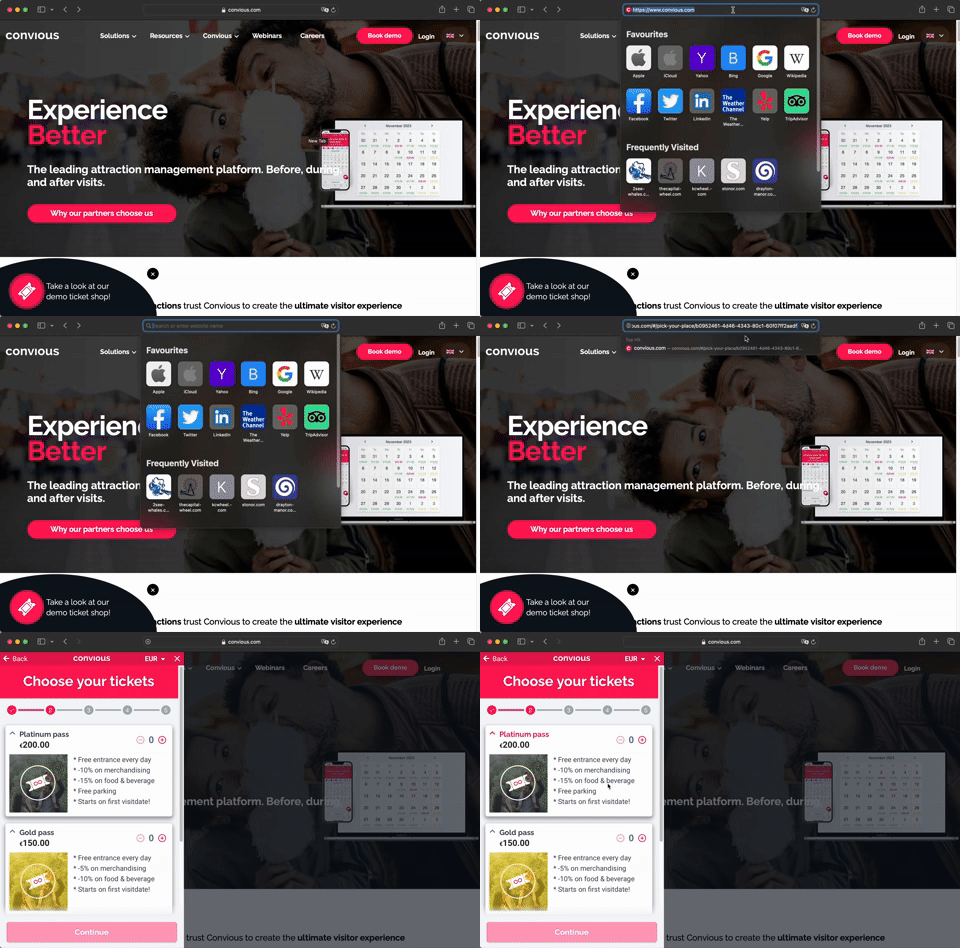
Deeplinks are smart URLs that guide customers directly to specific categories in your checkout process. These categories only need to be active; there's no need to make them visible on the front end. For example, a deeplink can lead a customer straight to annual passes, avoiding the general ticket selection.
Example of a deeplink:
https://www.convious.com/#/pick-your-place/b0952461-4d46-4343-80c1-60f07ff2aadf
2. Benefits of Deeplinks
2.1 Simplified Customer Journey
Deeplinks take customers directly to what they want, eliminating unnecessary steps. Whether purchasing a day ticket or an annual pass, deeplinks streamline the experience.
For instance, if you promote day tickets, a deeplink will guide users straight to the day ticket purchase page, skipping irrelevant options.
2.2 Maintaining Offer Privacy
If you're selling vouchers through partners like Groupdeal or Tesco, you may want to keep these partnerships private. Deeplinks allow voucher holders to redeem their vouchers without publicly revealing where they bought them. Categories can stay hidden from the general public but accessible to those with a deeplink.
2.3 Increased Conversion Rates
By reducing the number of clicks needed, deeplinks increase the chances that a customer will complete their purchase. Whether it's a day ticket, an annual pass, or a voucher, deeplinks keep the journey smooth and straightforward.
2.4 Control Over Hidden Categories
You can restrict certain categories (e.g., reseller vouchers) to customers with a valid link, ensuring that only they can see and redeem those offers.
2.5 Flexible Integration
Deeplinks fit seamlessly into your website for general campaigns or reseller promotions. They ensure customers always land on the right page.
Image suggestion: A diagram showing how deeplinks route users directly to different product categories, bypassing the main page.
3. Using Deeplinks in Buttons
Imagine you have a "Buy Tickets Here" button on your website. If this button links to a general page like https://www.convious.com, users might get frustrated because they land on the start page instead of where they expect.
Instead, using a deeplink like #/pick-your-place/ce68fff6-4ce9-4996-b5d1-1020baf7d0ad sends them directly to the right spot. This avoids reloading unnecessary pages and improves both speed and user experience (UX).
Example: Annual Passes
You offer three types of annual passes:
Platinum: Access all year.
Gold: Access all year except Christmas and New Year's.
Bronze: Access except holidays, Christmas, and New Year's.
Instead of sending users to a general category page, link each "Buy Now" button directly to the respective product page for that pass. This removes the need for them to choose again from a list.
Image suggestion: A comparison between using a general link vs. a deeplink for each product type, with arrows showing how deeplinks take users straight to their desired purchase.
4. Redirects
Redirects are helpful for customers using third-party vouchers. For example, if someone buys a voucher from ANWB, you can create a simple link like https://www.convious.com/ANWB, which redirects them to the correct deeplink for redeeming their voucher.
Example:
Instead of manually entering a complicated URL, you create
https://www.convious.com/ANWB, and the system redirects them tohttps://www.convious.com/#/pick-your-place/ce68fff6-4ce9-4996-b5d1-1020baf7d0ad.
The same applies to other partners like Tesco. You can create easy-to-remember links like https://www.convious.com/Tesco to ensure a smooth user experience.
Image suggestion: A flowchart illustrating the customer journey from clicking a partner-branded link (e.g., ANWB or Tesco) to being redirected to the appropriate category or product.
5. Need Help?
If you need further assistance or tips on improving your site, feel free to contact us at support@convious.com or get in touch with your Customer Success Manager.