

Overview
To support an effortless transition from legacy annual passes to Memberships, we’ve introduced a new feature that allows existing annual pass holders to renew directly into a membership — without re-entering their details or receiving a new card/barcode.
This upgrade provides a smoother customer experience and reduces operational workload for your team.
⚠️ Note: This feature only applies when migrating from annual passes to memberships, not from annual pass to annual pass renewals.
🌟 Key Benefits
Faster renewals – personal details are pre-filled automatically
Reduced friction – no need to re-upload photos or re-enter data
Lower operational costs – existing barcodes are retained, avoiding new card printing
Better data consistency – customer details remain accurate across renewals
⚙️ How to Enable the Feature
To activate this functionality, follow these steps in your Control Panel:
Navigate to Products and select your membership product.
When adding or editing a membership product, you’ll see a field to link legacy annual passes.
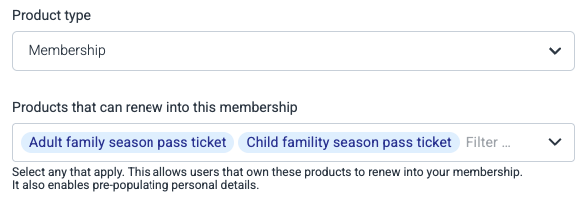
Select which annual pass products can renew into this membership (e.g. Gold Annual Pass → Gold Membership).
This step enables existing pass holders with those products to renew into the membership.
It also activates the pre-filling of personal details during the renewal process.
Important: When selecting products, make sure the membership product and the annual pass product belong to the same barcode pool.
This ensures barcodes are properly retained during renewal.
It also prevents accidental loss of barcode data if old annual pass configurations are later removed.
Once configured, visitors who own the linked annual pass can renew directly into the new membership product.
🧠 How Pre-Filling Works
The pre-filling logic follows a clear and secure process:
1️⃣ Buyer information
The system automatically pre-fills the buyer information using the most recently used details associated with that email address.
Buyers can still review and edit any information before proceeding.
2️⃣ Ticket holder information
The system displays all ticket holders (pass holders) associated with that email address in the last 2 years, but only for the connected annual pass products configured in Control Panel.
It removes duplicates and shows only the most recent data for each person.
It only displays profiles that have not yet been renewed into a membership.
3️⃣ Selecting pass holders
When filling in the After Payment Form, the buyer can select an existing pass holder.
Upon selection, the form automatically pre-fills with their details — including their photo.
The system also retains the same barcode from their previous annual pass (the barcode is displayed for convenience).
💡 Important:
If the buyer edits key details a new barcode will be generated for that member. Key details are: first name, last name and birth date. Other details, like the profile picture can be edited; this won't generate a new barcode.
4️⃣ Adding new members
Buyers can also add new members during checkout.
Example: if a customer previously purchased 3 annual passes but now wants 5 memberships, they can:
Select the 3 existing pass holders to pre-fill and retain barcodes.
Add 2 new members manually.
5️⃣ Final review
Before completing the process, all details can be reviewed and edited if needed, ensuring all data is correct before submission.
🧾 Summary of the renewal flow
Buyer selects the membership product and fills in the email address
Buyer click on the links in the email in order to verify the access to the email address.
System retrieves historical data linked to that email.
Buyer selects matching pass holders and verifies details.
After Payment Form is pre-filled; buyer reviews and submits.
Membership is renewed → existing barcode retained.
Data Privacy & GDPR Compliance
This feature has been designed in full accordance with the General Data Protection Regulation (GDPR).
Convious stores customer details (such as name, address, and photo) for a limited and justified period — solely for the purpose of facilitating the renewal of an annual pass into a membership. When renewing, the customer first needs to log in and verify their email address, ensuring the data is securely linked to the correct person. This makes it safe to pre-fill their information during renewal and allows the same barcode to be kept, so visitors can continue using their existing physical pass without needing a new one.
📘 Need Help?
For detailed guidance or to activate memberships at your venue, please reach out to your Customer Success Manager or check our related Knowledge Base article on Memberships