

Why Fiscal Compliance Matters in Germany
German law (KassenSichV, in force since January 2020) requires every electronic POS system to use a certified Technical Security System (TSS) to digitally sign every transaction. The TSS acts like a digital notary: it stamps each sale with a unique, tamper-proof code that proves the transaction happened at a specific time and cannot be altered after the fact.
If a tax auditor visits your venue, they will also expect your transaction records to be available in a standardised format called DSFinV-K — the same format used across all industries in Germany, from grocery stores to theme parks.
As of January 2025, there is an additional reporting obligation: all POS devices with an active TSS must be registered electronically with the German tax authority (ELSTER) within 30 days of going live.
Convious handles the TSS transaction signing and DSFinV-K export automatically. You are responsible for the ELSTER device registration — but the Convious support team will guide you through it.
What Convious Does for You
Convious is integrated with Fiskaly, a BSI-certified cloud TSS provider. Here is what happens automatically every time a sale is made at your POS:
Payment is confirmed at the POS terminal.
Convious sends the transaction data (amounts, VAT rates, items) to Fiskaly in real time.
Fiskaly signs the transaction with a unique digital signature and returns the signing data.
The signature data is stored securely and printed on the receipt.
This process takes milliseconds and is completely invisible to your staff and guests.
⚠️ Important: Make sure your products are configured with one of these tax rates: 19%, 7%, or 0%, according to German standards. Otherwise the transaction won't be signed.
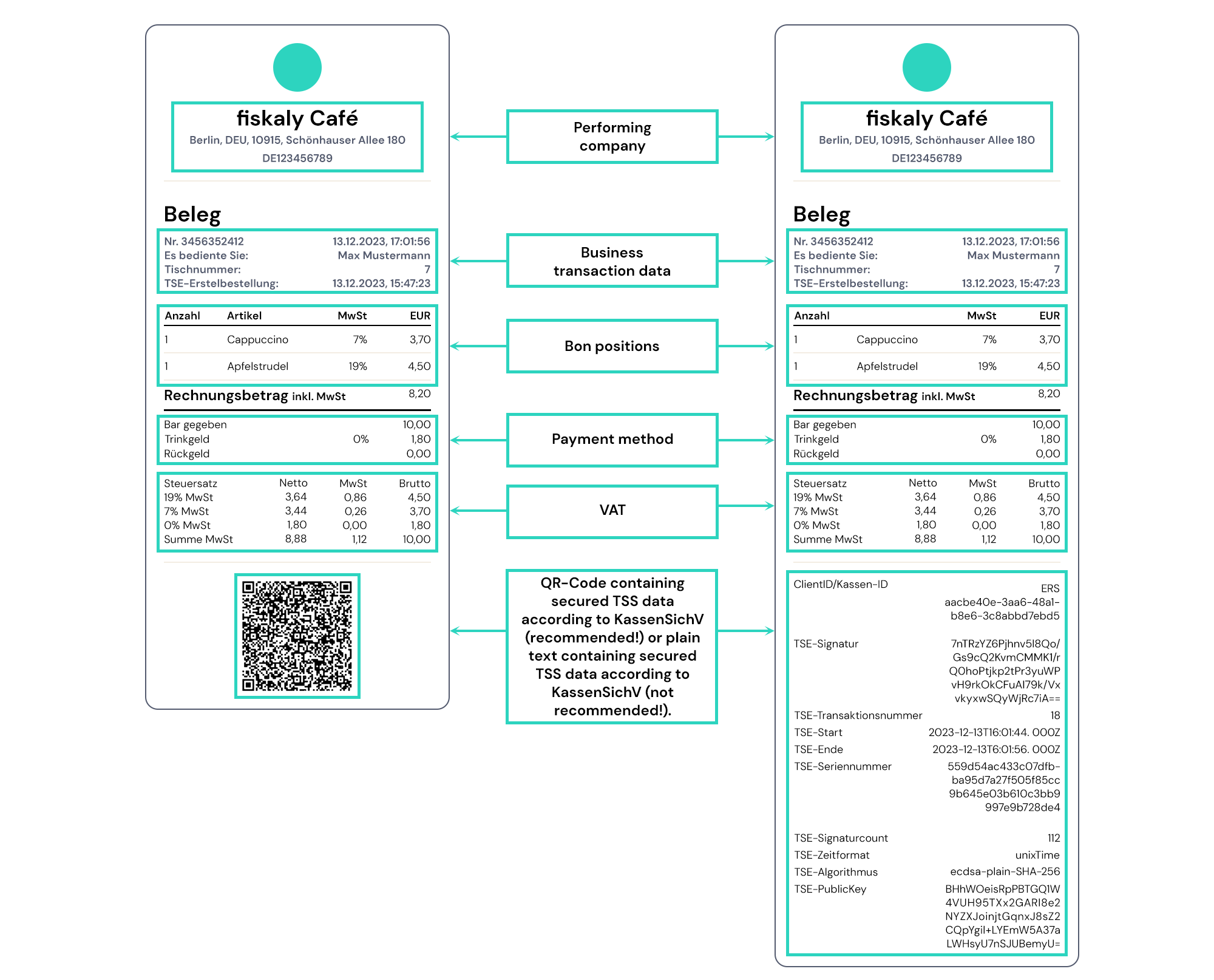
What data is available in the QR code on the receipt?
German law requires specific information on every POS receipt:
Feld Beleg | Feld SIGN DE |
TSE-Transaktion | number |
TSE-Start | time_start |
TSE-Stop | time_end |
TSE-Seriennummer | tss_serial_number |
TSE-Zeitformat | log.timestamp_format |
TSE-Hashalgorithmus | signature.algorithm |
TSE-PublicKey | signature.public_key |
ClientID / KassenID | client_serial_number (corresponds to serial number of the electronic record-keeping system) |
TSE-Erstbestellung | This field needs to be added manually by the cash register manufacturer |
QR-Code | qr_code_data |
Offline
If the Fiskaly API is down, the POS can still complete sales. Transactions are flagged as "TSE-Offline" and automatically re-signed by Fiskaly once connectivity is restored. This is compliant with German regulations.
What You Need to Do
1. Register your POS devices with ELSTER
Within 30 days of your Convious POS going live, you must register your POS devices with the German tax authority via ELSTER (the online tax office portal). This is a legal requirement.
The Convious support team will provide you with the TSS serial number and device details needed to complete the registration. If you are unsure how to submit the registration itself, contact your tax advisor.
⚠️ Important: Failure to register within 30 days is an audit risk. Contact Convious support as early as possible before your go-live date so the registration details can be prepared in time.
2. If you already have a Fiskaly account
If your venue was previously using a different POS provider with its own Fiskaly TSS, your existing TSS must be deactivated and a new one registered under the Convious organisation. This transition must be completed within 30 days of your Convious POS going live.
Do not deactivate your existing TSS before speaking to Convious support — the timing needs to be managed carefully to avoid any gaps in compliance.
Requesting Your Tax Audit Export (DSFinV-K)
If you are subject to a tax audit, you can request a DSFinV-K export from the Convious support team. This export contains all the standardised transaction data the German tax office requires, and can be provided for any date range you specify.
Contact Convious support with the date range you need and your venue details. The export will be provided as a ZIP file you can hand directly to your tax auditor or advisor.
💡 Note: German law requires transaction data to be retained for 10 years, even if you later switch providers or offboard from Convious. Archive your DSFinV-K export files in a location your finance team can access long term.
FAQ
Do I need my own Fiskaly account?
No. Convious manages the entire Fiskaly setup under our organisation. You do not need to create, configure, or manage a Fiskaly account.
Does this apply to my Kiosk as well as POS?
Standalone card-only kiosks in Germany are currently in a legally ambiguous area. Speak to your tax advisor to confirm whether your kiosk setup is in scope.
What VAT rates are supported?
Convious supports all standard German VAT rates: 19%, 7%, and 0%. These are configured per product in your Control Panel and included automatically in every signed transaction.
Is this available for venues outside Germany?
Currently, Convious's Fiskaly integration covers Germany. Fiscal compliance requirements vary significantly by country. If you operate in France or another regulated market, contact Convious support about your specific requirements and timeline.
How long does setup take?
If you are a new partner going live with Convious POS for the first time, Fiskaly configuration is handled as part of your onboarding — there is no separate setup step on your end.